Describe Data Security Posture Management
As organizations adopt AI tools and expand their data across cloud, on-premises, and third-party platforms, keeping track of sensitive information becomes more challenging. Data moves constantly between services and users, and traditional approaches that focus on securing individual endpoints or applications can leave gaps. Microsoft Purview Data Security Posture Management (DSPM) addresses this challenge by providing a unified view of an organization's data security landscape—helping you discover where sensitive data resides, assess how it's protected, and take action to reduce risk.
What is Data Security Posture Management?
Data Security Posture Management is a solution in Microsoft Purview that helps organizations discover, protect, and investigate sensitive data risks across their digital estate. Rather than focusing on infrastructure or endpoints, DSPM centers on the data itself. It continuously scans your environment to identify sensitive data, assess risk, and recommend actions to reduce exposure.
DSPM consolidates insights from several Microsoft Purview solutions—including data loss prevention (DLP), Insider Risk Management, information protection with sensitivity labels, and Data Security Investigations—into a single view for monitoring data risks, policy coverage, and posture trends.
DSPM answers four practical questions about an organization's data:
- What data do we have?
- Where is it stored?
- Who can access it?
- How is it protected?
When these questions are addressed, DSPM can automate remediation steps—such as removing public sharing links or applying DLP policies—to help prevent incidents before they happen. Investigation, alerting, analytics, and reporting are all integrated, supporting a layered security approach.
Data security objectives
After initial setup, DSPM presents data security objectives as prominent, selectable cards in the Microsoft Purview portal. Each objective represents a specific security goal, such as:
- Prevent data exposure in Microsoft 365 Copilot and Microsoft Copilot interactions
- Prevent oversharing of sensitive data
- Prevent exfiltration to risky locations
- Discover sensitive data in your organization
Selecting an objective guides you through an end-to-end workflow that groups together the most relevant Microsoft Purview solutions—such as information protection, DLP, Insider Risk Management, and eDiscovery. This approach lets you focus on achieving specific data security outcomes rather than navigating separate solutions individually.
Each objective card displays key metrics, such as the percentage of data covered by policies, the number of risky sharing incidents, or improvements over time. Within each objective, you see suggested prioritized actions—such as applying sensitivity labels, configuring DLP policies, or investigating alerts—all tailored to your organization's data. You can take action directly from the workflow, including remediating oversharing, configuring one-click policies, or launching investigations into suspicious activity.
Visibility across Microsoft and non-Microsoft environments
DSPM provides unified visibility across Microsoft 365, Azure, Microsoft Fabric, and integrated non-Microsoft software as a service (SaaS) platforms. This version of DSPM extends coverage to non-Microsoft SaaS and infrastructure as a service (IaaS) platforms—such as Google Cloud Platform, Snowflake, and Databricks—and integrates with partner solutions such as Cyera, BigID, and OneTrust for comprehensive risk insights.
The asset explorer provides a unified view across your organization of unlabeled or classified data by workload, filtered by Microsoft and non-Microsoft locations. This helps uncover shadow data—sensitive information that exists outside of known, managed locations—classify it, analyze access patterns, and highlight risks.
AI observability
As organizations adopt AI tools like Microsoft 365 Copilot, Copilot Studio, and non-Microsoft AI applications, new data security risks emerge. Users might inadvertently share sensitive data in AI prompts, or AI agents might access content that isn't adequately protected. DSPM provides dedicated dashboards and metrics to monitor these risks through AI observability.
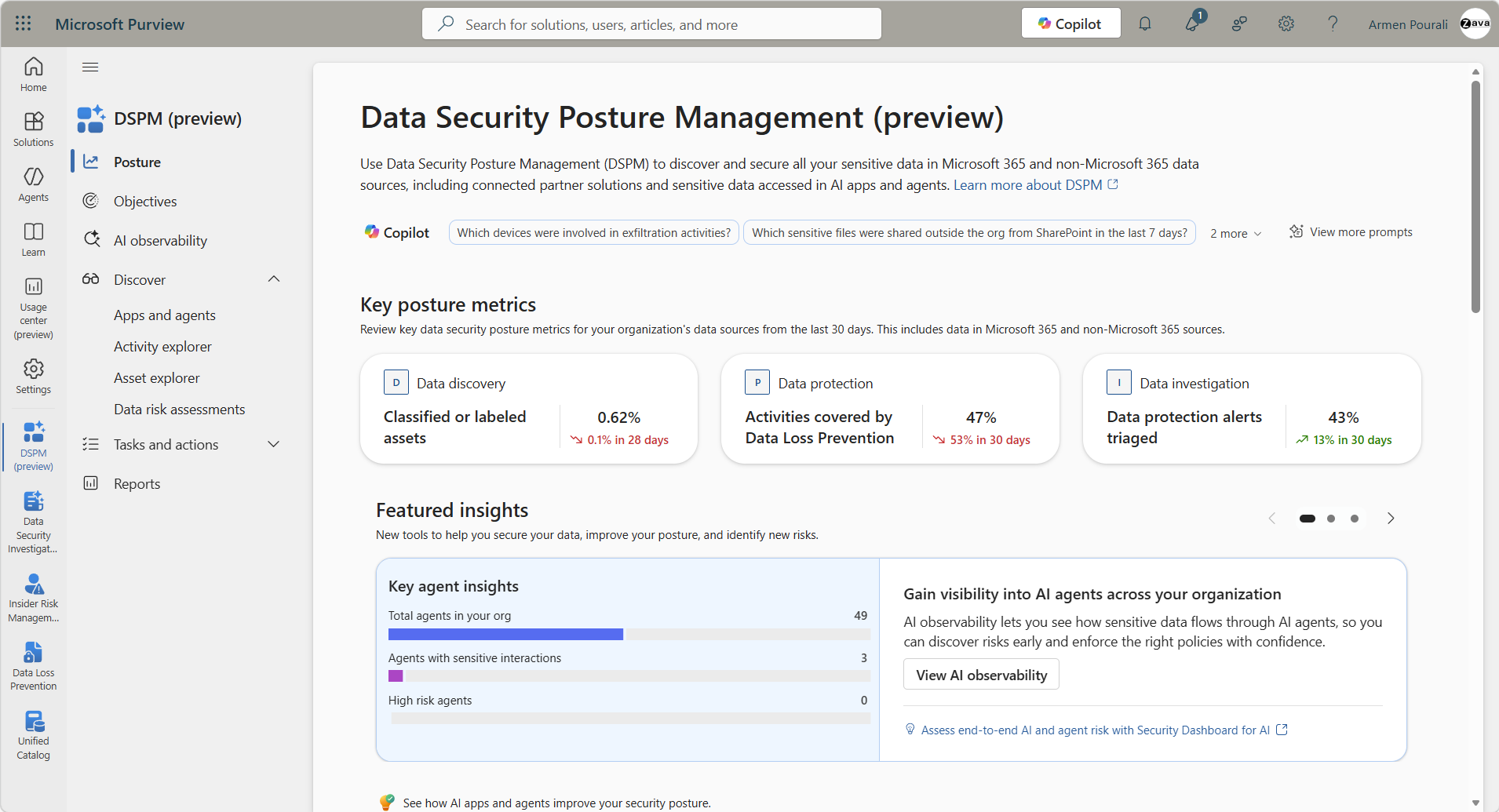
AI observability tracks agent-specific activities—such as oversharing, exfiltration, and unusual access patterns—across both Microsoft and non-Microsoft environments. The AI observability page shows an inventory of all AI apps and agents with activity in the last 30 days, including how many are high risk and the total with sensitive interactions. It provides a breakdown of individual agents and the policies that govern them.
This visibility helps organizations govern AI usage while protecting sensitive information from unauthorized access through AI interactions. For example, if an AI agent accesses sensitive financial data without appropriate DLP policies in place, DSPM surfaces this as a risk and recommends corrective actions. Organizations can then apply one-click policies directly from DSPM to close the gap.
How AI helps achieve data security outcomes
DSPM doesn't just secure AI apps—it also uses AI to help secure your data. Through integration with Microsoft Security Copilot and AI agents, DSPM helps you more quickly identify, protect, and investigate data across cloud, SaaS, on-premises, and AI environments.
AI analyzes access patterns, sharing behaviors, and policy gaps to surface actionable risks. It can detect unusual activity—such as excessive sharing or suspicious downloads—and prioritize incidents that need immediate attention. AI-driven triage agents review alerts from DLP and Insider Risk Management, filtering out noise and highlighting the most critical threats.
Under your guidance, AI agents can take direct action on detected risks—such as removing public sharing links, applying DLP policies, or revoking permissions. You review, approve, or customize the automated actions that AI agents take, and these actions are always audited. This combination of AI-driven analysis and human oversight helps organizations respond to data security incidents faster while maintaining control over the actions taken on their behalf. Data security becomes more adaptive and less reliant on manual intervention, allowing security teams to focus their attention on the most critical threats.
Key pages in DSPM
DSPM organizes its capabilities across several key pages in the Microsoft Purview portal:
- Posture: The main dashboard that lets you interact with Security Copilot through suggested prompts, view key posture metrics, see top objectives to address based on risk, review a snapshot of data use across your data estate, and track a 30-day trending graph for your organization's data security posture.
- Objectives: Data security objectives that help you address identified risks, each with a remediation plan that includes one-click policies and recommended actions.
- AI observability: An inventory of all AI apps and agents with activity details, risk assessments, and policies to govern them.
- Asset explorer: A unified view of unlabeled or classified data by workload, filtered by Microsoft and non-Microsoft locations.
- Reports: Dashboards to track sensitive data usage and labeling, policy usage, and risky behavior of users and AI agents.


Enhanced reporting provides advanced filtering and customizable views, supporting granular analysis of sensitive data usage, DLP activity, and posture trends. The dashboards and reports can be tailored to align with your organization's compliance requirements and operational priorities.
Operational insights and reporting
DSPM surfaces operational insights throughout the experience, including:
- Before you apply a remediation action, DSPM shows how many items, users, or locations the change affects (impact prediction visuals), and progress indicators track how far you've advanced through each objective's recommended steps
- Role-based access controls for granular access to features and AI content for delegated administration and compliance
- Audit logs and activity explorer features to track interactions with AI apps and agents, supporting compliance investigations and incident response
These reporting capabilities help organizations track their progress over time, identify areas where extra protection is needed, and demonstrate compliance improvements to stakeholders. Key metrics are tracked continuously, supporting ongoing improvement of your organization's data security posture.
DSPM and the broader Microsoft Purview ecosystem
DSPM brings together the capabilities you've explored in this module—data classification, sensitivity labels, DLP, Insider Risk Management, and adaptive protection—into a coordinated management experience. Rather than configuring each solution in isolation, DSPM provides a central location to view the combined effect of these solutions on your organization's data security.
For example, DSPM might identify that a significant portion of sensitive documents in SharePoint lack sensitivity labels and recommend a labeling policy. Or it might surface an insider risk alert related to a user who downloaded sensitive files and suggest escalating the case through Insider Risk Management. By connecting these capabilities under a unified posture view, DSPM helps organizations move from reactive incident response to proactive risk management.
DSPM also supports setup tasks that help you identify and complete configuration steps independently from the security objectives. These tasks include setting up a Microsoft Sentinel data lake to integrate with partner solutions for non-Microsoft data sources—such as Google Cloud Platform and Snowflake—expanding your visibility beyond the Microsoft ecosystem. Data risk assessments are another key capability, helping prevent oversharing of sensitive data through default or custom assessments that identify and fix potential data oversharing risks across your organization.