Nota:
El acceso a esta página requiere autorización. Puede intentar iniciar sesión o cambiar directorios.
El acceso a esta página requiere autorización. Puede intentar cambiar los directorios.
Importante
La herramienta Deep Research está en desuso. Se recomienda usar el o3-deep-research modelo con la búsqueda web o una herramienta MCP en su lugar. Para obtener instrucciones de migración, consulte la documentación de la herramienta de búsqueda web.
Nota
- El recurso del proyecto principal de Foundry y el modelo contenido
o3-deep-researchy los modelos GPT deben existir en la misma suscripción y región de Azure. Las regiones admitidas son Oeste de EE. UU . y Este de Noruega. - Esta herramienta solo está disponible en
2025-05-15-previewla API. Se recomienda encarecidamente migrar para usar la2025-11-15-previewAPI. Esto le permite usar elo3-deep-researchmodelo con la búsqueda web o la herramienta MCP.
Use este artículo para aprender a usar la herramienta Deep Research con el SDK de proyectos de IA de Azure, incluidos ejemplos de código e instrucciones de configuración.
Requisitos previos
Los requisitos de la información general de Deep Research.
Punto de conexión del Proyecto Microsoft Foundry.
Puede encontrar su punto de conexión en la visión general de su proyecto en el portal Microsoft Foundry, bajo Bibliotecas>Foundry.
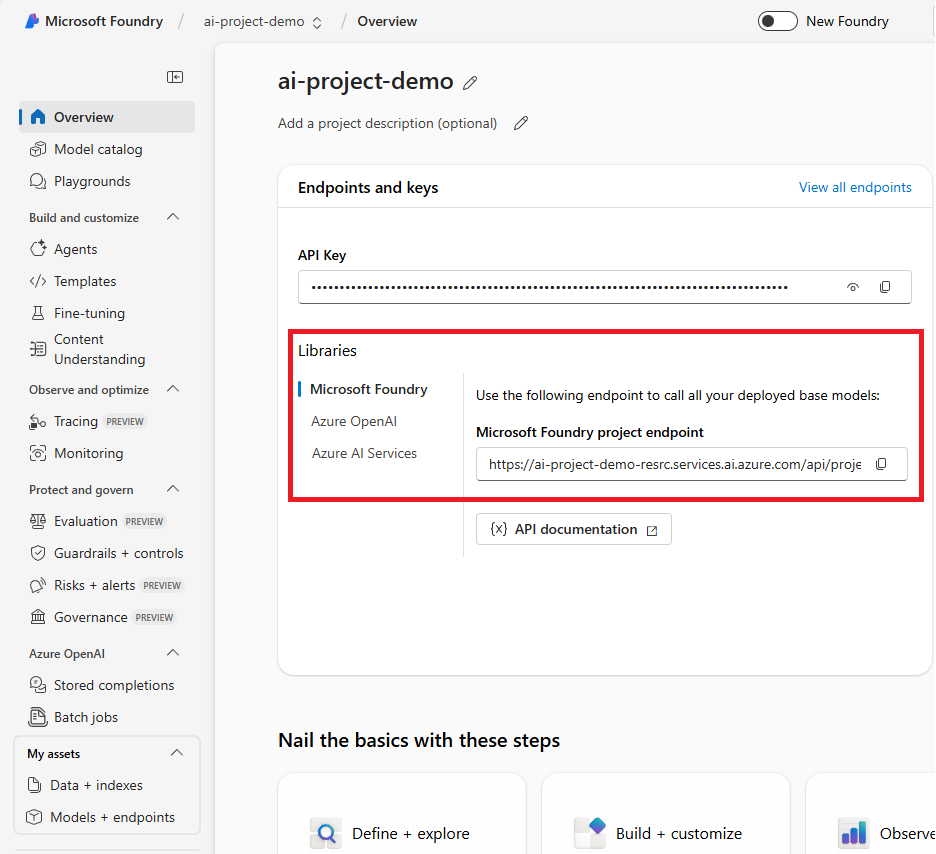
Guarde este punto de conexión en una variable de entorno denominada
PROJECT_ENDPOINT.Los nombres de implementación de tus modelos
o3-deep-research-modelygpt-4o. Puede encontrarlos en Modelos y puntos de conexión en el menú de navegación izquierdo.
Guarde el nombre de su
o3-deep-researchimplementación como una variable de entorno denominadaDEEP_RESEARCH_MODEL_DEPLOYMENT_NAMEy el nombre degpt-4oimplementación como una variable de entorno denominadaMODEL_DEPLOYMENT_NAME.

Nota
Otros modelos de la serie GPT, como GPT-4o-mini y la serie GPT-4.1, no se admiten para la aclaración del ámbito.
El identificador de conexión del recurso Grounding con Bing Search. Para encontrarlo en el portal de Foundry, seleccione Centro de administración en el menú de navegación izquierdo. A continuación, seleccione Recursos conectados. A continuación, seleccione el recurso de Bing.

Copie el identificador y guárdelo en una variable de entorno denominada
AZURE_BING_CONECTION_ID.


Creación de un agente con la herramienta Deep Research
Nota
Necesita la versión 1.1.0-beta.4 o posterior del paquete Azure.AI.Agents.Persistent, y el paquete Azure.Identity.
using Azure;
using Azure.AI.Agents.Persistent;
using Azure.Identity;
using System.Collections.Generic;
using System.Text;

var projectEndpoint = System.Environment.GetEnvironmentVariable("PROJECT_ENDPOINT");
var modelDeploymentName = System.Environment.GetEnvironmentVariable("MODEL_DEPLOYMENT_NAME");
var deepResearchModelDeploymentName = System.Environment.GetEnvironmentVariable("DEEP_RESEARCH_MODEL_DEPLOYMENT_NAME");
var connectionId = System.Environment.GetEnvironmentVariable("AZURE_BING_CONECTION_ID");
PersistentAgentsClient client = new(projectEndpoint, new DefaultAzureCredential());

// DeepResearchToolDefinition should be initialized with the name of deep research model and the Bing connection ID,
// needed to perform the search in the internet.

DeepResearchToolDefinition deepResearch = new(
    new DeepResearchDetails(
        model: deepResearchModelDeploymentName,
        bingGroundingConnections: [
            new DeepResearchBingGroundingConnection(connectionId)
        ]
    )
);

// NOTE: To reuse existing agent, fetch it with get_agent(agent_id)
PersistentAgent agent = client.Administration.CreateAgent(
    model: modelDeploymentName,
    name: "Science Tutor",
    instructions: "You are a helpful Agent that assists in researching scientific topics.",
    tools: [deepResearch]
);

//Create a thread and run and wait for the run to complete.

PersistentAgentThreadCreationOptions threadOp = new();
threadOp.Messages.Add(new ThreadMessageOptions(
        role: MessageRole.User,
        content: "Research the current state of studies on orca intelligence and orca language, " +
        "including what is currently known about orcas' cognitive capabilities, " +
        "communication systems and problem-solving reflected in recent publications in top their scientific" +
        "journals like Science, Nature and PNAS."
    ));
ThreadAndRunOptions opts = new()
{
    ThreadOptions = threadOp,
};
ThreadRun run = client.CreateThreadAndRun(
    assistantId: agent.Id,
    options: opts
);

Console.WriteLine("Start processing the message... this may take a few minutes to finish. Be patient!");
do
{
    Thread.Sleep(TimeSpan.FromMilliseconds(500));
    run = client.Runs.GetRun(run.ThreadId, run.Id);
}
while (run.Status == RunStatus.Queued
    || run.Status == RunStatus.InProgress);

// We will create a helper function PrintMessagesAndSaveSummary, which prints the response from the agent,
// and replaces the reference placeholders by links in Markdown format.
// It also saves the research summary in the file for convenience.

static void PrintMessagesAndSaveSummary(IEnumerable<PersistentThreadMessage> messages, string summaryFilePath)
{
    string lastAgentMessage = default;
    foreach (PersistentThreadMessage threadMessage in messages)
    {
        StringBuilder sbAgentMessage = new();
        Console.Write($"{threadMessage.CreatedAt:yyyy-MM-dd HH:mm:ss} - {threadMessage.Role,10}: ");
        foreach (MessageContent contentItem in threadMessage.ContentItems)
        {
            if (contentItem is MessageTextContent textItem)
            {
                string response = textItem.Text;
                if (textItem.Annotations != null)
                {
                    foreach (MessageTextAnnotation annotation in textItem.Annotations)
                    {
                        if (annotation is MessageTextUriCitationAnnotation uriAnnotation)
                        {
                            response = response.Replace(uriAnnotation.Text, $" [{uriAnnotation.UriCitation.Title}]({uriAnnotation.UriCitation.Uri})");
                        }
                    }
                }
                if (threadMessage.Role == MessageRole.Agent)
                    sbAgentMessage.Append(response);
                Console.Write($"Agent response: {response}");
            }
            else if (contentItem is MessageImageFileContent imageFileItem)
            {
                Console.Write($"<image from ID: {imageFileItem.FileId}");
            }
            Console.WriteLine();
        }
        if (threadMessage.Role == MessageRole.Agent)
            lastAgentMessage = sbAgentMessage.ToString();
    }
    if (!string.IsNullOrEmpty(lastAgentMessage))
    {
        File.WriteAllText(
            path: summaryFilePath,
            contents: lastAgentMessage);
    }
}

//List the messages, print them and save the result in research_summary.md file.
//The file will be saved next to the compiled executable.

Pageable<PersistentThreadMessage> messages
    = client.Messages.GetMessages(
        threadId: run.ThreadId, order: ListSortOrder.Ascending);
PrintMessagesAndSaveSummary([.. messages], "research_summary.md");

// NOTE: Comment out these two lines if you want to delete the agent.
client.Threads.DeleteThread(threadId: run.ThreadId);
client.Administration.DeleteAgent(agentId: agent.Id);
Nombre del recurso de Grounding con Bing Search. Para encontrarlo en el portal de Foundry, seleccione Centro de administración en el menú de navegación izquierdo. Seleccione Recursos conectados y, a continuación, seleccione el recurso Grounding with Bing Search (Conexión con Bing Search).
Copie el identificador y guárdelo en una variable de entorno denominada
AZURE_BING_CONECTION_ID.
Guarde este punto de conexión en una variable de entorno denominada
BING_RESOURCE_NAME.
Creación de un agente con la herramienta Deep Research
Nota
Necesita la versión preliminar más reciente del @azure/ai-projects paquete.
import type {
  MessageTextContent,
  ThreadMessage,
  DeepResearchToolDefinition,
  MessageTextUrlCitationAnnotation,
} from "@azure/ai-agents";
import { AgentsClient, isOutputOfType } from "@azure/ai-agents";
import { DefaultAzureCredential } from "@azure/identity";

import "dotenv/config";

const projectEndpoint = process.env["PROJECT_ENDPOINT"] || "<project endpoint>";
const modelDeploymentName = process.env["MODEL_DEPLOYMENT_NAME"] || "gpt-4o";
const deepResearchModelDeploymentName =
  process.env["DEEP_RESEARCH_MODEL_DEPLOYMENT_NAME"];
const bingConnectionId = process.env["AZURE_BING_CONNECTION_ID"] || "<connection-id>";

/**
 * Fetches and prints new agent response from the thread
 * @param threadId - The thread ID
 * @param client - The AgentsClient instance
 * @param lastMessageId - The ID of the last message processed
 * @returns The ID of the newest message, or undefined if no new message
 */
async function fetchAndPrintNewAgentResponse(
  threadId: string,
  client: AgentsClient,
  lastMessageId?: string,
): Promise<string | undefined> {
  const messages = client.messages.list(threadId);
  let latestMessage: ThreadMessage | undefined;
  for await (const msg of messages) {
    if (msg.role === "assistant") {
      latestMessage = msg;
      break;
    }
  }

  if (!latestMessage || latestMessage.id === lastMessageId) {
    return lastMessageId;
  }

  console.log("\nAgent response:");

  // Print text content
  for (const content of latestMessage.content) {
    if (isOutputOfType<MessageTextContent>(content, "text")) {
      console.log(content.text.value);
    }
  }

  const urlCitations = getUrlCitationsFromMessage(latestMessage);
  if (urlCitations.length > 0) {
    console.log("\nURL Citations:");
    for (const citation of urlCitations) {
      console.log(`URL Citations: [${citation.title}](${citation.url})`);
    }
  }

  return latestMessage.id;
}

/**
 * Extracts URL citations from a thread message
 * @param message - The thread message
 * @returns Array of URL citations
 */
function getUrlCitationsFromMessage(message: ThreadMessage): Array<{ title: string; url: string }> {
  const citations: Array<{ title: string; url: string }> = [];

  for (const content of message.content) {
    if (isOutputOfType<MessageTextContent>(content, "text")) {
      for (const annotation of content.text.annotations) {
        if (isOutputOfType<MessageTextUrlCitationAnnotation>(annotation, "url_citation")) {
          citations.push({
            title: annotation.urlCitation.title || annotation.urlCitation.url,
            url: annotation.urlCitation.url,
          });
        }
      }
    }
  }

  return citations;
}

/**
 * Creates a research summary from the final message
 * @param message - The thread message containing the research results
 * @param filepath - The file path to write the summary to
 */
function createResearchSummary(message: ThreadMessage): void {
  if (!message) {
    console.log("No message content provided, cannot create research summary.");
    return;
  }

  let content = "";

  // Write text summary
  const textSummaries: string[] = [];
  for (const contentItem of message.content) {
    if (isOutputOfType<MessageTextContent>(contentItem, "text")) {
      textSummaries.push(contentItem.text.value.trim());
    }
  }
  content += textSummaries.join("\n\n");

  // Write unique URL citations, if present
  const urlCitations = getUrlCitationsFromMessage(message);
  if (urlCitations.length > 0) {
    content += "\n\n## References\n";
    const seenUrls = new Set<string>();
    for (const citation of urlCitations) {
      if (!seenUrls.has(citation.url)) {
        content += `- [${citation.title}](${citation.url})\n`;
        seenUrls.add(citation.url);
      }
    }
  }

  // writeFileSync(filepath, content, "utf-8");
  console.log(`Research summary created:\n${content}`);
  // console.log(`Research summary written to '${filepath}'.`);
}

export async function main(): Promise<void> {
  // Create an Azure AI Client
  const client = new AgentsClient(projectEndpoint, new DefaultAzureCredential());

  // Create Deep Research tool definition
  const deepResearchTool: DeepResearchToolDefinition = {
    type: "deep_research",
    deepResearch: {
      deepResearchModel: deepResearchModelDeploymentName,
      deepResearchBingGroundingConnections: [
        {
          connectionId: bingConnectionId,
        },
      ],
    },
  };

  // Create agent with the Deep Research tool
  const agent = await client.createAgent(modelDeploymentName, {
    name: "my-agent",
    instructions: "You are a helpful Agent that assists in researching scientific topics.",
    tools: [deepResearchTool],
  });
  console.log(`Created agent, ID: ${agent.id}`);

  // Create thread for communication
  const thread = await client.threads.create();
  console.log(`Created thread, ID: ${thread.id}`);

  // Create message to thread
  const message = await client.messages.create(
    thread.id,
    "user",
    "Research the current scientific understanding of orca intelligence and communication, focusing on recent (preferably past 5 years) peer-reviewed studies, comparisons with other intelligent species such as dolphins or primates, specific cognitive abilities like problem-solving and social learning, and detailed analyses of vocal and non-vocal communication systems—please include notable authors or landmark papers if applicable.",
  );
  console.log(`Created message, ID: ${message.id}`);

  console.log("Start processing the message... this may take a few minutes to finish. Be patient!");

  // Create and poll the run
  const run = await client.runs.create(thread.id, agent.id);
  let lastMessageId: string | undefined;

  // Poll the run status
  let currentRun = run;
  while (currentRun.status === "queued" || currentRun.status === "in_progress") {
    await new Promise((resolve) => setTimeout(resolve, 1000)); // Wait 1 second
    currentRun = await client.runs.get(thread.id, run.id);

    lastMessageId = await fetchAndPrintNewAgentResponse(thread.id, client, lastMessageId);
    console.log(`Run status: ${currentRun.status}`);
  }

  console.log(`Run finished with status: ${currentRun.status}, ID: ${currentRun.id}`);

  if (currentRun.status === "failed") {
    console.log(`Run failed: ${currentRun.lastError}`);
  }

  // Fetch the final message from the agent and create a research summary
  const messages = client.messages.list(thread.id, { order: "desc", limit: 10 });
  let finalMessage: ThreadMessage | undefined;

  for await (const msg of messages) {
    if (msg.role === "assistant") {
      finalMessage = msg;
      break;
    }
  }

  if (finalMessage) {
    createResearchSummary(finalMessage);
  }

  // Clean-up and delete the agent once the run is finished
  await client.deleteAgent(agent.id);
  console.log("Deleted agent");
}

main().catch((err) => {
  console.error("The sample encountered an error:", err);
});
Nombre del recurso de Grounding con Búsqueda de Bing. Para encontrarlo en el portal de Foundry, seleccione Centro de administración en el menú de navegación izquierdo. A continuación, seleccione Recursos conectados.
Guarde este punto de conexión en una variable de entorno denominada
BING_RESOURCE_NAME.
Creación de un agente con la herramienta Deep Research
La herramienta Deep Research requiere la versión 1.1.0b3 o posterior (pero anterior a 2.0.0) de la azure-ai-projects biblioteca, que tiene como destino la 2025-05-15-preview API. En primer lugar, se recomienda crear un entorno virtual en el que trabajar:
python -m venv env
# after creating the virtual environment, activate it with:
.\env\Scripts\activate
Puede instalar el paquete con el siguiente comando:
pip install --pre "azure-ai-projects>=1.1.0b3,<2.0.0"
import os, time
from typing import Optional
from azure.ai.projects import AIProjectClient
from azure.identity import DefaultAzureCredential
from azure.ai.agents import AgentsClient
from azure.ai.agents.models import DeepResearchTool, MessageRole, ThreadMessage

def fetch_and_print_new_agent_response(
    thread_id: str,
    agents_client: AgentsClient,
    last_message_id: Optional[str] = None,
) -> Optional[str]:
    response = agents_client.messages.get_last_message_by_role(
        thread_id=thread_id,
        role=MessageRole.AGENT,
    )
    if not response or response.id == last_message_id:
        return last_message_id  # No new content

    print("\nAgent response:")
    print("\n".join(t.text.value for t in response.text_messages))

    for ann in response.url_citation_annotations:
        print(f"URL Citation: [{ann.url_citation.title}]({ann.url_citation.url})")

    return response.id

def create_research_summary(
        message : ThreadMessage,
        filepath: str = "research_summary.md"
) -> None:
    if not message:
        print("No message content provided, cannot create research summary.")
        return

    with open(filepath, "w", encoding="utf-8") as fp:
        # Write text summary
        text_summary = "\n\n".join([t.text.value.strip() for t in message.text_messages])
        fp.write(text_summary)

        # Write unique URL citations, if present
        if message.url_citation_annotations:
            fp.write("\n\n## References\n")
            seen_urls = set()
            for ann in message.url_citation_annotations:
                url = ann.url_citation.url
                title = ann.url_citation.title or url
                if url not in seen_urls:
                    fp.write(f"- [{title}]({url})\n")
                    seen_urls.add(url)

    print(f"Research summary written to '{filepath}'.")

project_client = AIProjectClient(
    endpoint=os.environ["PROJECT_ENDPOINT"],
    credential=DefaultAzureCredential(),
)

conn_id = project_client.connections.get(name=os.environ["BING_RESOURCE_NAME"]).id

# Initialize a Deep Research tool with Bing Connection ID and Deep Research model deployment name
deep_research_tool = DeepResearchTool(
    bing_grounding_connection_id=conn_id,
    deep_research_model=os.environ["DEEP_RESEARCH_MODEL_DEPLOYMENT_NAME"],
)

# Create Agent with the Deep Research tool and process Agent run
agents_client = AgentsClient(
    endpoint=os.environ["PROJECT_ENDPOINT"],
    credential=DefaultAzureCredential()
)

# Create a new agent that has the Deep Research tool attached.
# NOTE: To add Deep Research to an existing agent, fetch it with `get_agent(agent_id)` and then,
# update the agent with the Deep Research tool.
agent = agents_client.create_agent(
    model=os.environ["MODEL_DEPLOYMENT_NAME"],
    name="my-agent",
    instructions="You are a helpful Agent that assists in researching scientific topics.",
    tools=deep_research_tool.definitions,
)

# agent = agent_poller.result()  # Wait for completion

# [END create_agent_with_deep_research_tool]
print(f"Created agent, ID: {agent.id}")

# Create thread for communication
thread = agents_client.threads.create()
print(f"Created thread, ID: {thread.id}")

# Create message to thread
message = agents_client.messages.create(
    thread_id=thread.id,
    role="user",
    content=(
        "Assess the UK outlook for 2026 - economic growth and inflation, based on IMF sources and provide a detailed report."
    ),
)
print(f"Created message, ID: {message.id}")

print(f"Start processing the message... this may take a few minutes to finish. Be patient!")
# Poll the run as long as run status is queued or in progress
run = agents_client.runs.create(thread_id=thread.id, agent_id=agent.id)
last_message_id = None
while run.status in ("queued", "in_progress"):
    time.sleep(1)
    run = agents_client.runs.get(thread_id=thread.id, run_id=run.id)

    last_message_id = fetch_and_print_new_agent_response(
        thread_id=thread.id,
        agents_client=agents_client,
        last_message_id=last_message_id,
    )
    print(f"Run status: {run.status}")

print(f"Run finished with status: {run.status}, ID: {run.id}")

if run.status == "failed":
    print(f"Run failed: {run.last_error}")

# Fetch the final message from the agent in the thread and create a research summary
final_message = agents_client.messages.get_last_message_by_role(
    thread_id=thread.id, role=MessageRole.AGENT
)
if final_message:
    create_research_summary(final_message)

# Clean-up and delete the agent once the run is finished.
# NOTE: Comment out this line if you plan to reuse the agent later.
agents_client.delete_agent(agent.id)
print("Deleted agent")
Nota
- Limitación: la herramienta Deep Research solo se recomienda actualmente en escenarios que no son de streaming. Su uso con streaming puede funcionar, pero puede que ocasionalmente se agote el tiempo de espera y, por tanto, no se recomienda.
- Actualmente, la interfaz de usuario de Foundry Agent Playground solo admite ejecuciones de inicio en modo de streaming y, como resultado, los usuarios pueden experimentar caídas de conexión y tiempos de espera. Utilice los métodos admitidos mencionados anteriormente que operan en modo no streaming.